Touch Panel Display and LCD Touch Screen: Smart Display Technology Guide
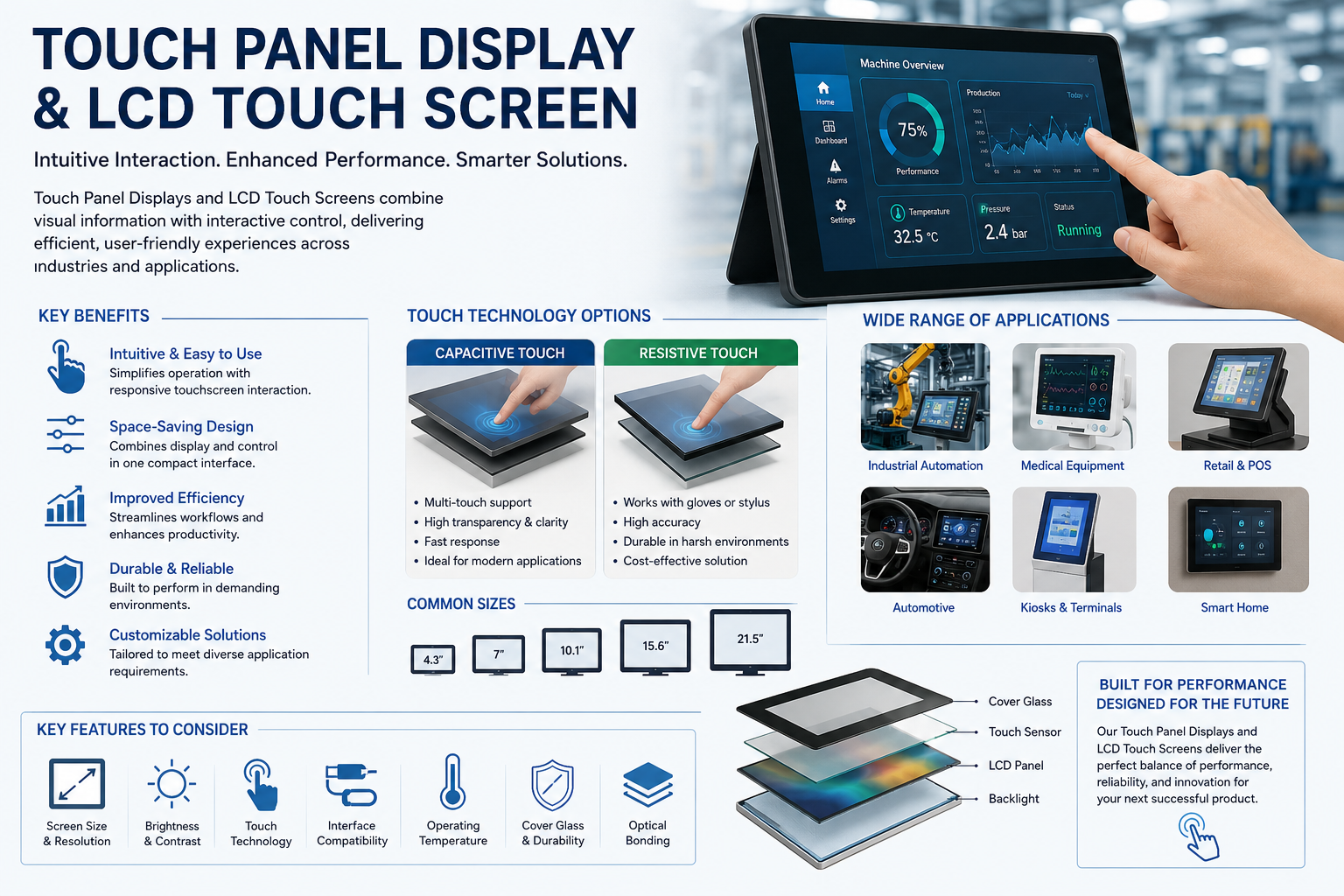
From industrial machinery and medical equipment to kiosks, automobiles, home appliances, and consumer electronics, the Touch Panel Display has transformed how users communicate with machines. Instead of relying on keyboards, physical buttons, or external controllers, users can operate systems directly through the screen.
At the same time, the lcd touch screen remains one of the most widely adopted display technologies because it offers reliable image quality, flexible sizing, efficient power consumption, and compatibility with different touch technologies. Understanding how these displays work, their types, advantages, applications, and selection criteria can help manufacturers and system designers choose the right solution for modern electronic products.
What Is a Touch Panel Display?
A Touch Panel Display is an electronic display equipped with a touch-sensitive surface that allows users to interact with software by touching icons, menus, buttons, or other graphical elements.
The touch panel detects the location of the user’s finger or stylus and converts that physical interaction into an electrical signal. A controller then processes this signal and sends the corresponding coordinates to the operating system.
A typical touch display solution may contain:
- LCD display module
- Touch sensor
- Touch controller
- Protective cover glass
- Backlight system
- Display interface
- Flexible printed circuit
- Optical bonding material
By integrating these components, manufacturers can create compact human-machine interfaces suitable for commercial, industrial, and consumer applications.
How Does an LCD Touch Screen Work?
An lcd touch screen combines liquid crystal display technology with a touch-sensitive input layer.
The LCD portion produces images by controlling liquid crystals positioned between polarising layers. Because liquid crystals do not produce their own light, an LED backlight generally illuminates the screen.
The touch layer is placed either above the LCD or integrated into the display structure. When a user touches the surface, the touch sensor detects the contact location.
The process generally works as follows:
- The LCD displays the graphical user interface.
- The user touches a menu, button, or icon.
- The touch sensor detects the contact position.
- The controller calculates the X and Y coordinates.
- The device operating system receives the input.
- The appropriate command or application is activated.
This instant interaction makes touchscreen displays efficient for equipment where fast and simple operation is important.
Main Types of Touch Panel Display Technology
Different applications require different touchscreen technologies. The most common choices include resistive and capacitive solutions.
Resistive touch panels operate using two electrically conductive layers separated by a small gap. When pressure is applied, the layers make contact and identify the touch position.
They can usually be operated with:
- Fingers
- Gloves
- Plastic styluses
- Mechanical pointers
Resistive technology is often used in industrial controllers, POS terminals, measuring instruments, and older medical devices.
Capacitive touchscreens detect changes in an electrical field when a conductive object such as a human finger touches the surface.
Projected capacitive technology is especially common in smartphones, tablets, automotive displays, and modern industrial interfaces because it supports excellent transparency and multi-touch operation.
Capacitive vs Resistive Touch Panels
| Feature | Capacitive Touch | Resistive Touch |
| Touch response | Very responsive | Pressure based |
| Multi-touch | Supported | Usually limited |
| Image clarity | Excellent | Good |
| Glove operation | Depends on design | Generally supported |
| Stylus support | Conductive stylus | Almost any stylus |
| Durability | High | Moderate to high |
| Common applications | Smartphones, kiosks, automotive | Industrial equipment, control systems |
The correct technology should be selected according to the operating environment rather than appearance alone.
Important Advantages of an LCD Touch Screen
An lcd touch screen can offer several practical advantages compared with conventional displays combined with external buttons.
One major benefit is simplified operation. Users can directly select the information or function displayed on the screen, reducing the learning curve.
Other important benefits include:
- Space-saving product design
- Attractive modern appearance
- Custom graphical interfaces
- Fast command execution
- Reduced mechanical button requirements
- Multiple functions on one screen
- Easy software-based interface updates
- High information density
Because controls can be changed through software, manufacturers can introduce new functions without redesigning large numbers of physical switches.
Major Applications of Touch Panel Displays
The versatility of the Touch Panel Display allows it to serve many industries.
Industrial automation systems use touch displays as Human Machine Interfaces for controlling machines, monitoring production, checking alarms, and adjusting operating parameters.
Medical equipment may use touchscreen technology in:
- Patient monitoring systems
- Diagnostic equipment
- Laboratory analysers
- Imaging devices
- Portable healthcare equipment
Touch displays are also common in automobiles for infotainment, climate control, navigation, instrument panels, and rear-seat entertainment.
Retail and public-facing applications include payment terminals, self-service kiosks, vending machines, ticketing systems, information displays, and restaurant ordering systems.
Consumer applications include smart appliances, home automation panels, exercise equipment, security systems, coffee machines, and entertainment devices.
Key Features to Consider When Selecting a Touch Display
Selecting the right touchscreen requires careful evaluation of both display performance and environmental requirements.
Resolution is important because higher resolutions produce sharper text, graphics, images, and interface elements.
Brightness should also be considered. Standard indoor devices may require moderate brightness, while outdoor equipment may need a high-brightness LCD capable of remaining visible under sunlight.
Important selection factors include:
- Screen size
- Display resolution
- Brightness
- Viewing angle
- Touch technology
- Interface compatibility
- Operating temperature
- Cover glass thickness
- Surface treatment
- Power consumption
- Backlight lifetime
- Environmental resistance
Manufacturers should also consider whether optical bonding, anti-glare treatment, anti-fingerprint coating, or custom cover glass is required.
Why Optical Bonding Matters
Optical bonding is a process where transparent adhesive fills the air gap between the touch panel and LCD.
Removing this air gap can reduce internal reflections and improve readability, particularly under bright lighting conditions.
Optical bonding may also provide:
- Better display contrast
- Improved sunlight readability
- Reduced internal condensation
- Greater mechanical strength
- Improved touch appearance
This technique is particularly valuable for automotive, marine, medical, outdoor, and industrial touchscreen applications.
Importance of Touchscreen Durability
Durability is critical when displays are used in factories, transportation systems, public kiosks, or outdoor equipment.
A properly designed Touch Panel Display may include chemically strengthened glass or specially treated cover lenses to resist scratches and impacts.
Industrial applications may additionally require resistance against:
- Dust
- Water
- Oil
- Chemicals
- Vibration
- Temperature changes
- Electromagnetic interference
Choosing the correct materials and enclosure design can significantly increase the useful operating life of the touchscreen system.
Customisation Options for Touch Panel Displays
Custom touchscreen solutions allow manufacturers to integrate displays more effectively into their products.
Common customisation possibilities include:
- Custom cover glass dimensions
- Printed borders and logos
- Special glass thickness
- Touch controller tuning
- Flexible cable modifications
- Connector positioning
- Anti-glare coating
- Anti-reflective coating
- Waterproof design
- Optical bonding
- Custom brightness
- Special operating temperature ranges
Customisation is particularly valuable when designing specialised equipment that cannot use standard display dimensions.
Touch Panel Display Trends and Future Development
Touchscreen technology continues to advance as devices become more connected and intelligent.
Modern displays increasingly combine touchscreen operation with embedded processors, gesture recognition, smart sensors, and advanced graphical interfaces.
Industrial systems are also moving toward larger, higher-resolution displays that can present real-time machine data, dashboards, alerts, and remote monitoring information.
Automotive manufacturers are adopting wider displays and integrated digital cockpits, while consumer appliance companies are replacing traditional mechanical controls with touch-enabled interfaces.
Future display development is expected to focus on improved durability, reduced power consumption, better outdoor readability, thinner construction, and more responsive interaction.
Frequently Asked Questions About Touch Panel Displays
1. What is a Touch Panel Display?
A Touch Panel Display combines visual output with touch-based input, allowing users to interact directly with information shown on the screen.
2. What is an lcd touch screen?
An lcd touch screen combines a liquid crystal display with a touch-sensitive panel for both visual information and user input.
3. Which touchscreen technology is most popular?
Projected capacitive touch technology is widely used because of its responsiveness, clarity, durability, and multi-touch capability.
4. Can touchscreen displays work with gloves?
Yes. Resistive touchscreens commonly work with gloves, while specially configured capacitive touchscreens can also support gloved operation.
5. What sizes are available for touch displays?
Touch displays are available in many sizes, ranging from compact displays for handheld devices to large industrial and commercial screens.
6. Can an LCD touchscreen be used outdoors?
Yes. Outdoor applications generally require higher brightness, suitable cover glass, weather protection, and sometimes optical bonding.
7. What is multi-touch technology?
Multi-touch allows a touchscreen to detect multiple contact points simultaneously, enabling gestures such as pinch, zoom, and rotation.
8. What is the purpose of cover glass?
Cover glass protects the touch sensor and LCD while providing a smooth user-facing surface.
9. What interfaces are used with LCD displays?
Common interfaces include RGB, LVDS, MIPI, HDMI, SPI, and other application-specific connections.
10. Can touch panel displays be customised?
Yes. Dimensions, cover glass, connectors, brightness, coatings, touch controllers, and other characteristics can often be customised according to project requirements.